How to Change Your Daily Anki Card Amount
Step-by-step guide on how to change the number of Anki cards you do every day in 2 minutes.
Resources
Goal: Change the number of Anki Cards you do daily (without breaking anything)
Reading time: 2 minutes
Step 1:
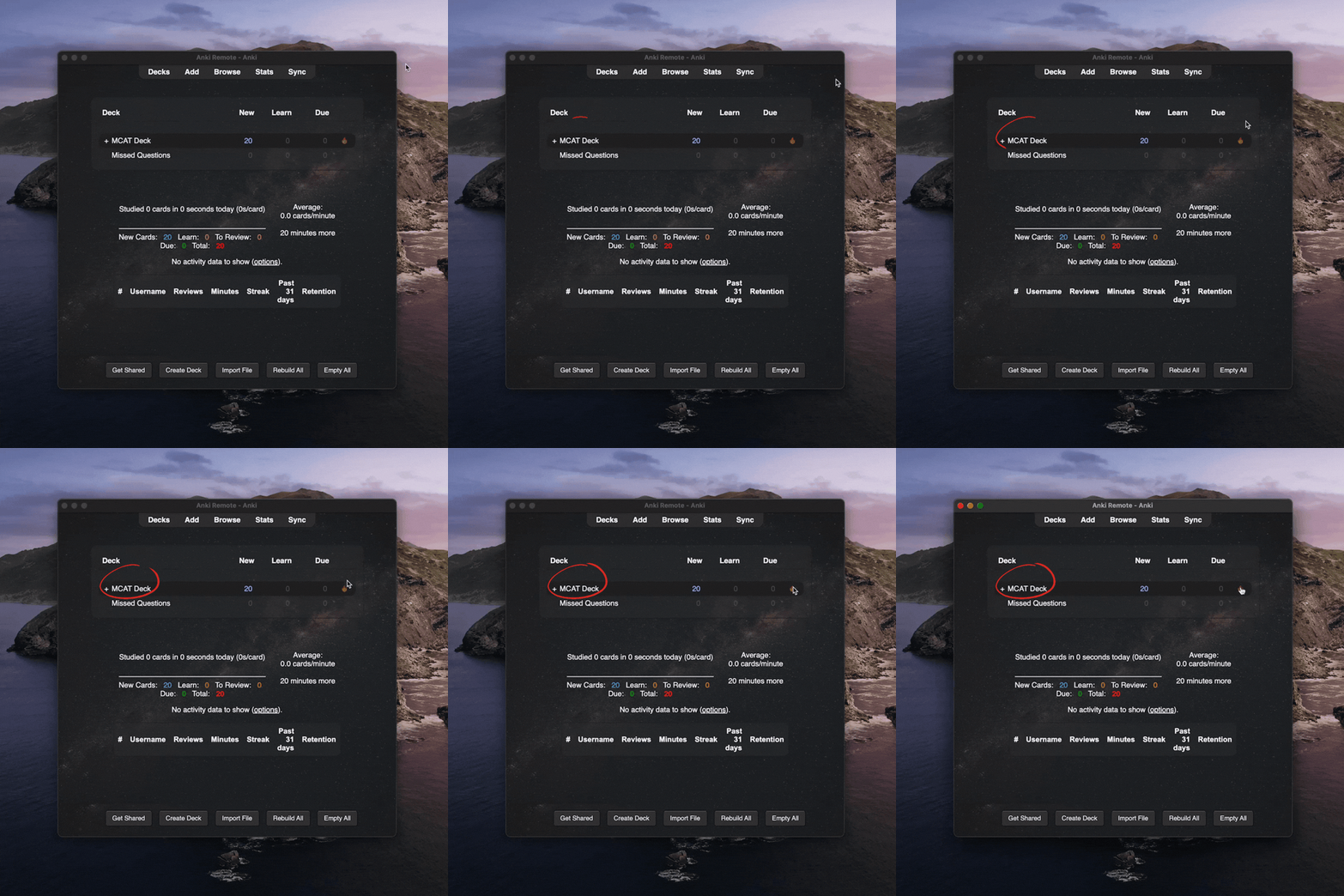
Select the deck you wanna set your daily card amount on, right from the Anki homepage.
Step 2:
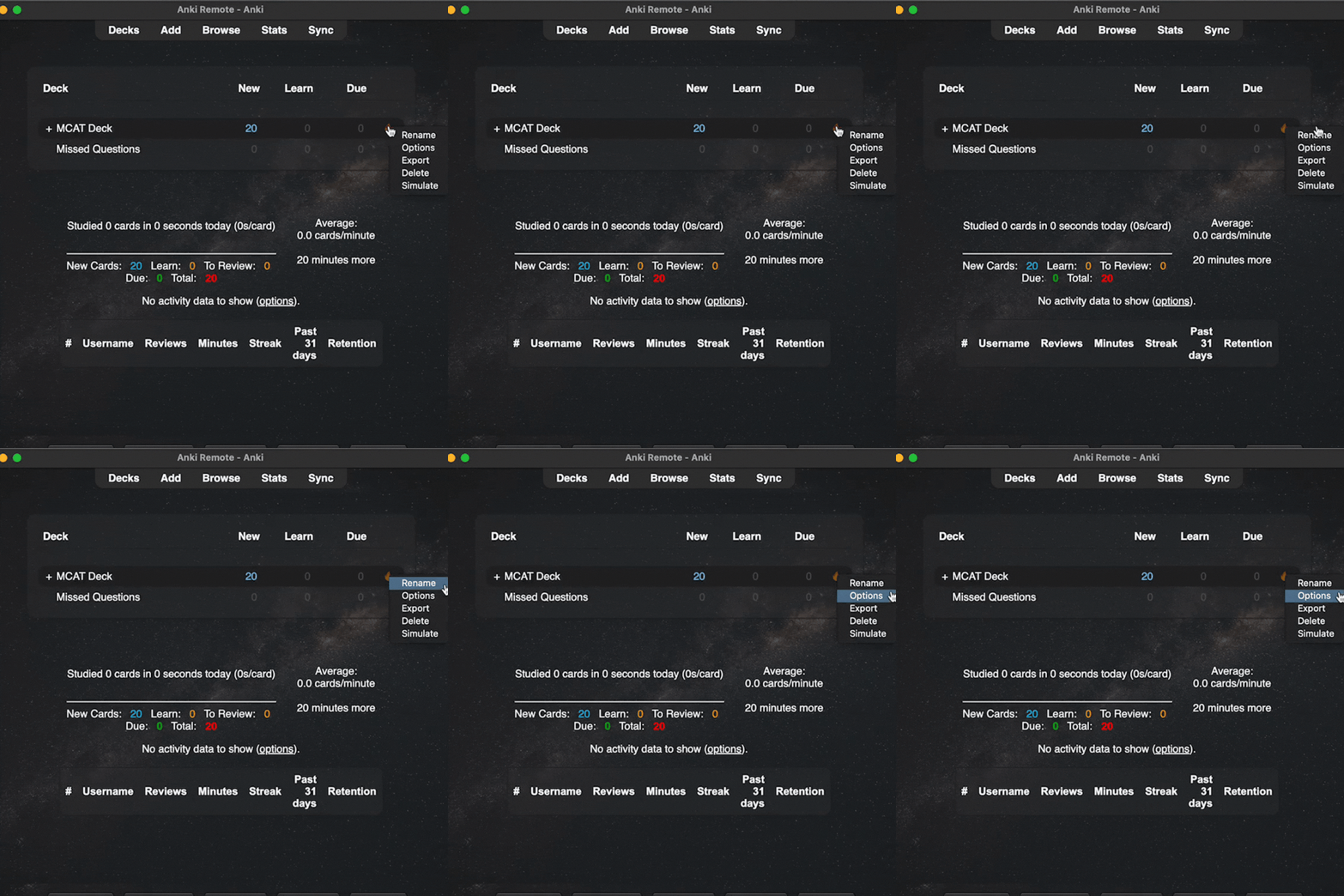
Click the small icon in the right corner of the deck you want, then click ‘Options’.
(closer look below)
Step 3:
Look for the daily limits section - you'll find the "new cards/day" and "maximum reviews/day" preset. Update them based on how many cards you wanna tackle each day.
If you don't know how many cards you should do daily, check out the Anki Calculator to figure it out.

How to change your daily card limit on iPad, iPhone, and Android
The steps above cover desktop Anki. If you review on mobile — most people do — here's how to change the same setting in AnkiMobile (iOS) and AnkiDroid (Android). Changes made on mobile sync to your desktop and AnkiWeb automatically, so you only need to do it in one place.
On iPad and iPhone (AnkiMobile)
- Open AnkiMobile and tap the deck you want to change.
- Tap Options at the top of the screen.
- Scroll to the New Cards section and tap New cards/day to enter your target number.
- Do the same for Reviews → Maximum reviews/day (set this to 500 or higher — more on this below).
- Tap Save in the top right.
On Android (AnkiDroid)
- Open AnkiDroid and long-press the deck you want to change.
- Tap Deck options (or use the three-dot menu → Deck options depending on your AnkiDroid version).
- Under Daily limits, tap New cards/day and enter your number.
- Tap Maximum reviews/day and enter your number.
- Tap the checkmark or back arrow to save — AnkiDroid saves automatically.
A note on the "on app" question
If you searched "how to increase Anki card limit on app," the steps depend on which app you meant:
- Anki desktop (Mac/Windows/Linux) — Follow Steps 1–3 above (the desktop instructions).
- AnkiMobile (iOS) — Use the iPad/iPhone steps in this section.
- AnkiDroid (Android) — Use the Android steps in this section.
- AnkiWeb (browser) — AnkiWeb doesn't have a settings interface for daily limits. Change the limit in desktop or mobile Anki, then sync — the change carries through to AnkiWeb automatically.
How many Anki cards per day should you do?
There's no universal answer — it depends on what you're studying and how much time you have — but here are the ranges that work for most people.
By use case
| What you're studying | New cards per day | Time commitment |
|---|---|---|
| MCAT prep (3–6 months out) | 30–50 | 60–90 min/day |
| MCAT prep (6+ months out) | 20–30 | 45–60 min/day |
| USMLE Step 1 dedicated (4–8 weeks out) | 0–20 new; focus on reviews | 3–4 hrs/day of reviews |
| USMLE Step 1 prep (6+ months out) | 30–100 | 2–3 hrs/day |
| Medical school coursework | 20–40 | 45–60 min/day |
| INBDE / dental board prep | 30–50 | 60–90 min/day |
| Language learning (immersive) | 20–30 | 30–45 min/day |
| Language learning (casual) | 5–15 | 10–20 min/day |
| General coursework / studying | 10–25 | 20–40 min/day |
| Trying Anki for the first time | 10 | 15–20 min/day |
Time estimates assume you're doing reviews too, not just new cards.
Reviews vs. new cards — the key rule
Set maximum reviews per day high — 500 or even 9999. Almost no one hits these numbers, and capping reviews artificially is the fastest way to build a backlog you can't clear.
The number that actually matters is new cards per day. Every new card you add today becomes 4–6 review cards over the next month. So if you set new cards to 50, expect your review count to climb to 200–300 per day within a few weeks. Plan for the review load, not just the daily new cards.
Use the Anki Card Calculator for exact numbers
If you have a specific deck size and test date, run the numbers through the Anki Card Calculator. It tells you exactly how many cards per day you need to finish a deck by a specific date, and how much daily review time to expect at that pace.
Common mistakes
- Setting new cards too high, too soon. Going from 20 to 100 on day one seems ambitious, but 100 new cards create 400+ reviews within a month. Most people quit at that point. Increase in small steps (20 → 30 → 40). Making sure the cards themselves are worth reviewing helps too — see our guide on how to make Anki cards you'll actually do before you scale up.
- Setting new cards to zero permanently. If you never add new cards, you're not learning new material. Reviews-only mode is fine for the week before an exam, not for months.
- Ignoring the review count. New cards are the "input" number, but reviews are what determine your daily time commitment. If reviews are ballooning, reduce new cards — not the other way around.
- Changing the limit every day based on how you feel. Pick a number, stick with it for at least 2 weeks, then adjust based on how your review load evolves. Constant tweaking never lets you see the pattern.
How long does it take to add up?
At 30 new cards per day, you'll add ~900 cards per month. At 60, ~1,800. For context: the Milesdown MCAT deck is ~2,900 cards, Abdullah's is ~16,000, AnKing Step 1 is ~30,000+. Pick a daily rate that gets you through your target deck with a comfortable buffer before your test date.
Optional:
If you want to get through your Anki card easily, we highly recommend getting an Anki Remote. We have had countless premeds and med students email us saying that no matter what they tried, they could not stick with Anki. Well, until they got an Anki Remote. Once they got an Anki Remote, Anki became fast and fun.
I love my anki remote, it makes my morning studying hours so easy and effective and I get studying done hours earlier than without it! I take it with me wherever I go and it's made my medical journey a lot easier :) Zayan Musa ⭐️⭐️⭐️⭐️⭐️
